
How Pathmonk brings you traffic
The Acquisition section is where you see every channel that sends you visitors, scored and diagnosed, and where you switch on the features that produce more of them: every feature here exists to bring more of the right visitors to your site.. It has four parts: Overview, Content Generation, Ads Creation and Social. The Overview tells you where you stand. The other three are factories that produce the content, ads and posts to improve it, all grounded in your Company DNA so everything sounds like your business.
What's in this section
| Sub-section | What it's for |
|---|---|
| Overview | Your control center for tracking every traffic source, scored and diagnosed |
| Content Generation | The Content Factory: research to published article, for Google and AI answer engines |
| Ads Creation | The Campaign Factory: launch-ready search and social campaigns from what you sell |
| Social | The Social Factory: content pillars to a scheduled, on-brand posting program |
Overview: your traffic control center
Open Acquisition → Overview and you land on the Acquisition Engine. Every channel is scored out of 100 over the period you pick (7, 30 or 90 days), so you can see at a glance which sources are earning their place and which are slipping.
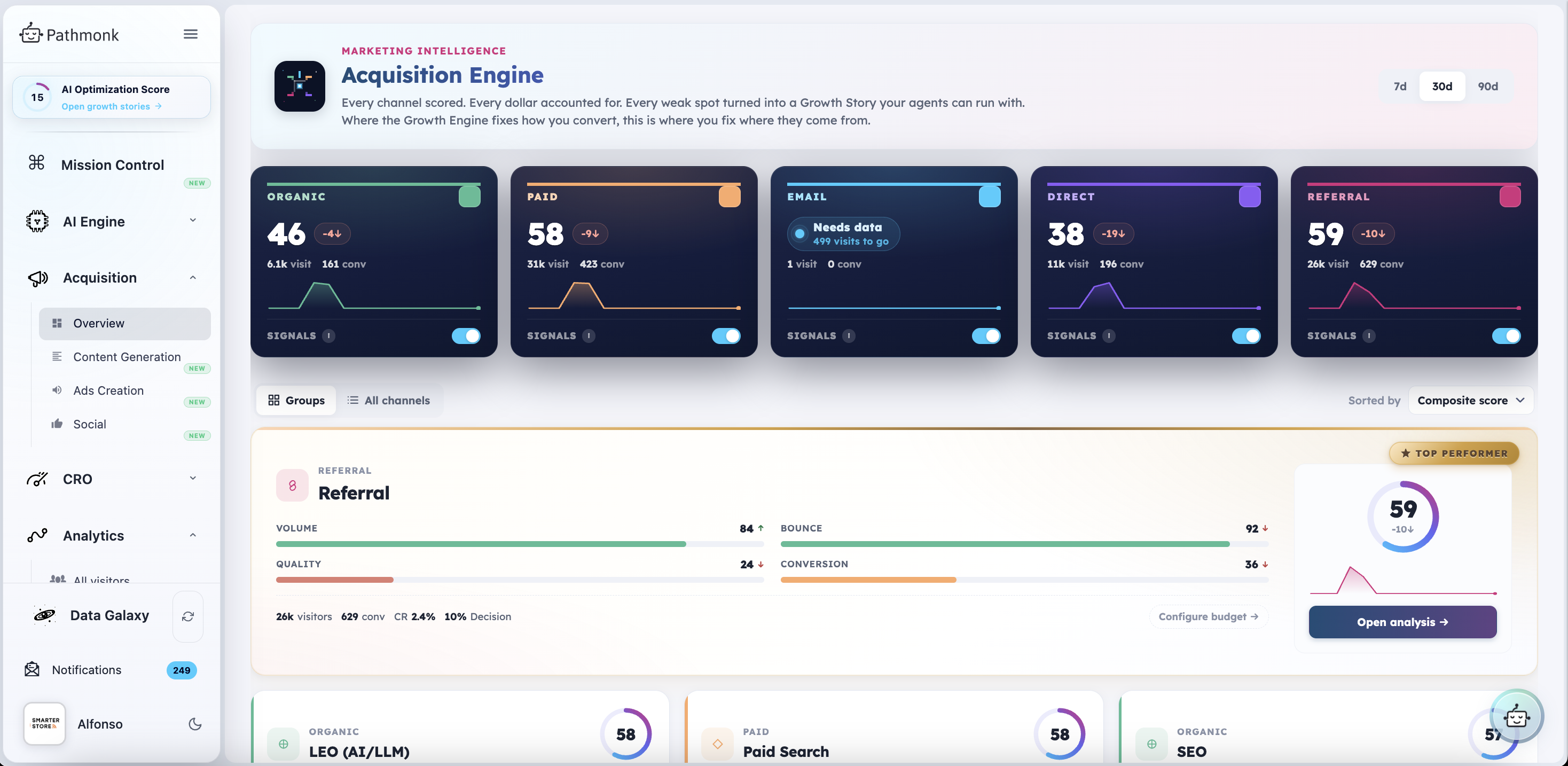
Each channel card shows:
- The composite score and its change versus the previous period, so a drop is visible before it shows up in your pipeline
- Visits and conversions for the period
- A trend line of the last 30 days
- A Signals toggle, which controls whether that channel feeds behavioural signal into the engine
A channel that has not collected enough data yet says so directly, for example Needs data, 499 visits to go, instead of showing you a score built on nothing.
Below the cards you can switch between Groups (Organic, Paid, Email, Direct, Referral) and All channels (the individual sources inside them), and sort by composite score. The top performer for the period is highlighted with its four pillar scores and a Configure budget shortcut.
Clicking into a group
Click any channel or group and it opens in place, with a full read on that traffic.
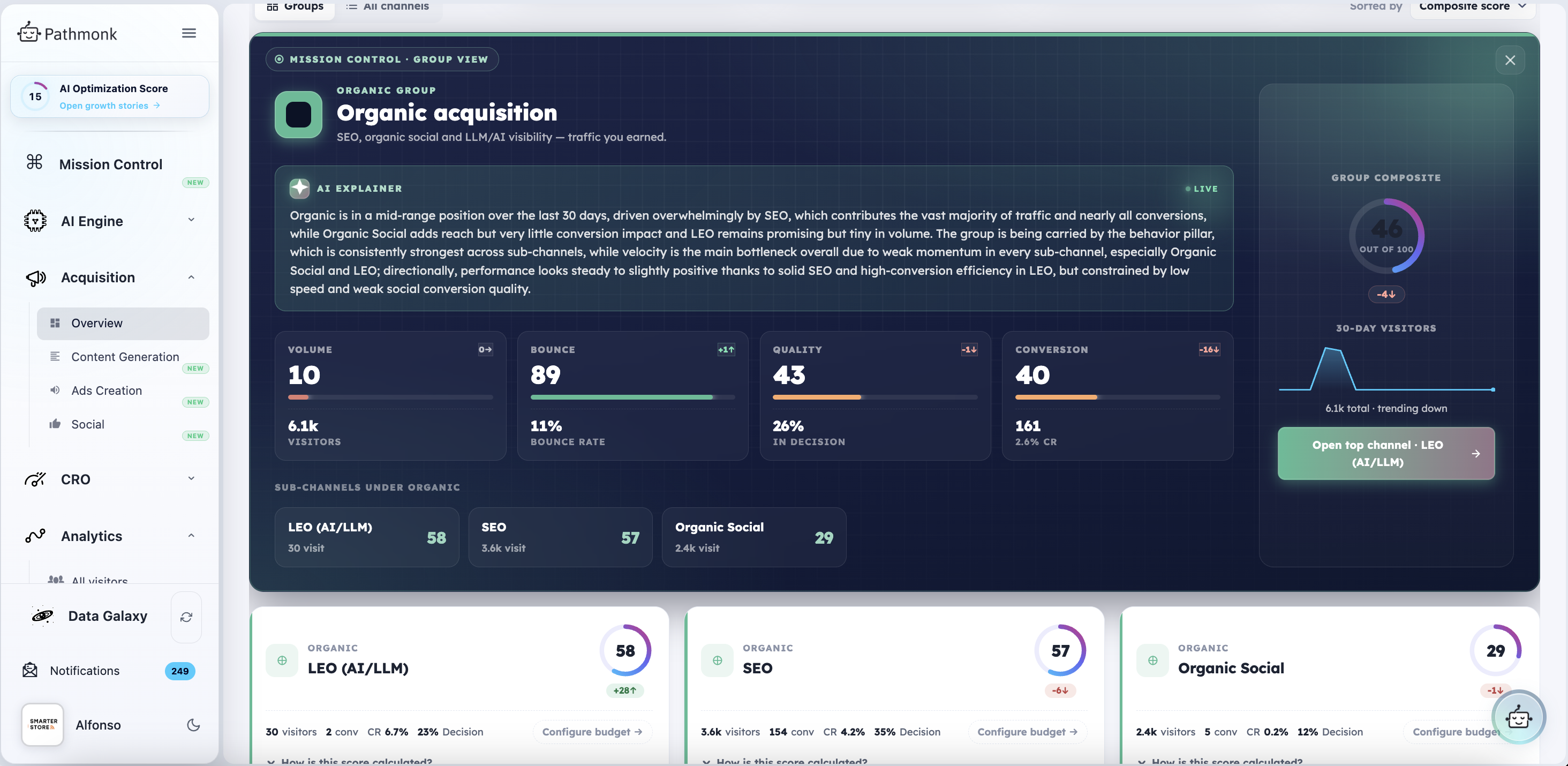
You get:
- An AI explainer written live, in plain language, telling you what is driving the score and what is holding it back
- The four pillars every score is built from: Volume, Bounce, Quality (the share of visitors reaching the Decision stage) and Conversion
- The sub-channels inside the group, each with its own score. Under Organic, for example, you see LEO (AI/LLM), SEO and Organic Social side by side, which is how you tell whether your traffic is coming from an AI assistant, from your SEO work, or from social
Opening a single channel's analysis
From there, Open analysis gives you the diagnosis for one channel.
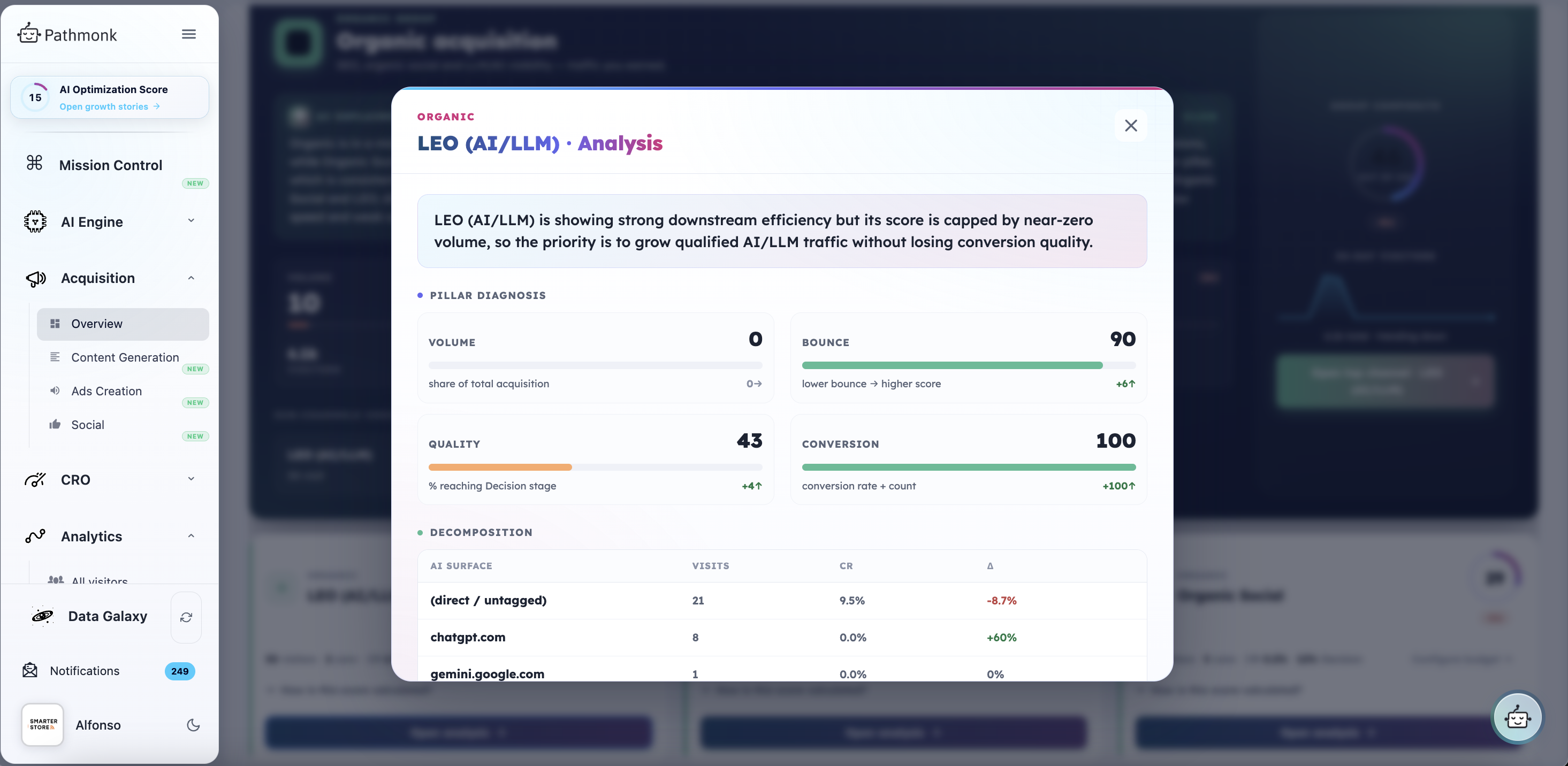
Two things to read here:
- Pillar diagnosis. Each pillar scored, with what it measures and how much it moved. This is what tells you whether a weak channel is weak because nobody arrives, or because the people who arrive don't stay.
- Decomposition. The breakdown by source, with visits, conversion rate and change. On the LEO channel that means the individual AI surfaces, so you can see traffic arriving from ChatGPT or Gemini separately from untagged direct visits.
This is your control center for tracking all your traffic acquisition efforts, paid search, paid social, display and the rest included. Everything below is how you act on it.
Content Generation: the Content Factory
Acquisition → Content Generation is where you create content for your website or blog. It runs research to published article, written for Google (SEO) and for AI answer engines (GEO) at the same time.
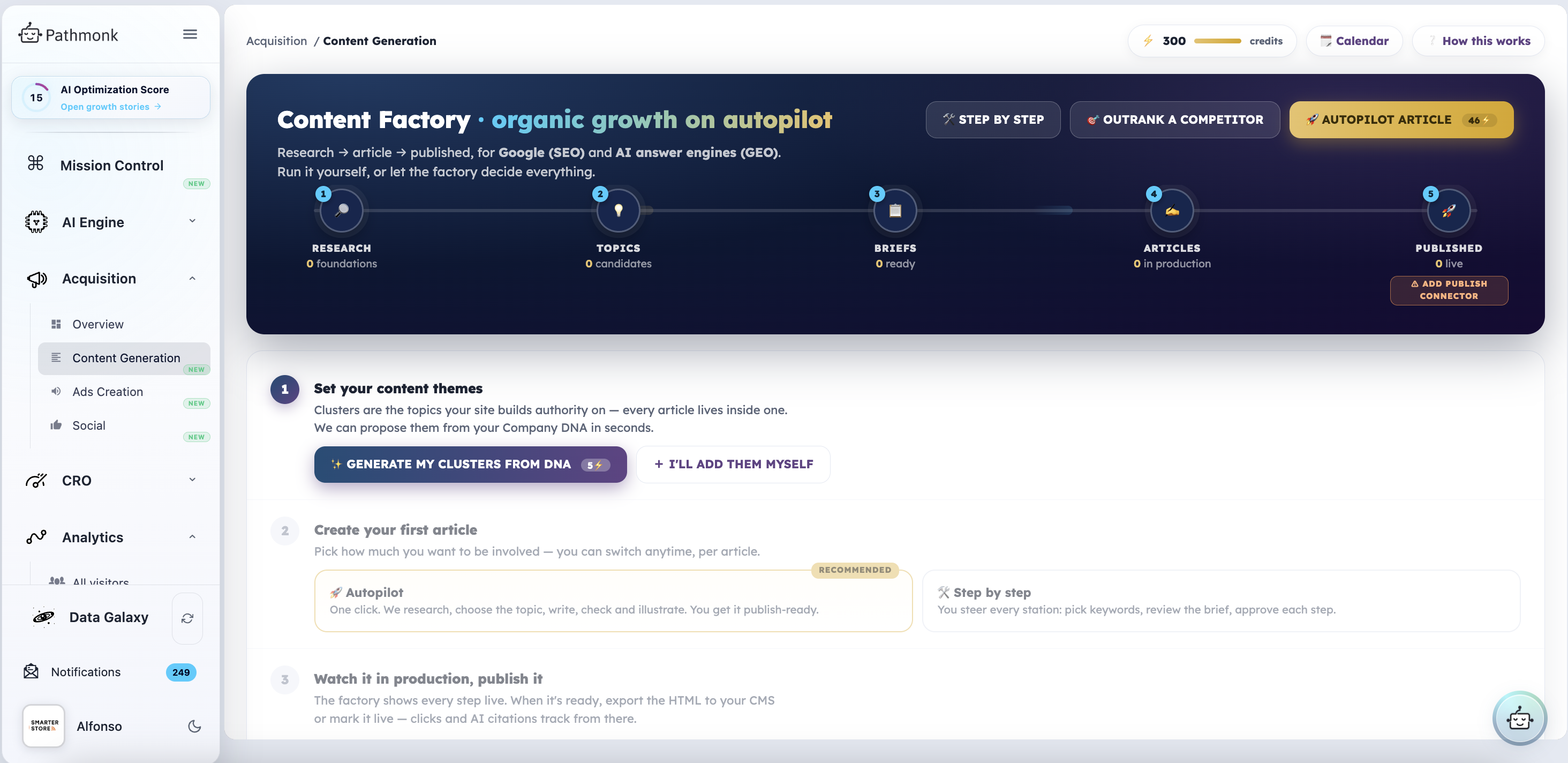
The pipeline has five stations, and the factory shows you live where every piece sits: Research → Topics → Briefs → Articles → Published.
Start with your clusters. Clusters are the themes your site builds authority on, and every article lives inside one. Click Generate my clusters from DNA and Pathmonk proposes them from your Company DNA in seconds, or add them yourself.
Then pick how involved you want to be. You can switch per article, at any time:
- Autopilot (recommended): one click. Pathmonk researches, chooses the topic, writes, checks and illustrates. You get it publish-ready.
- Step by step: you steer every station, picking keywords, reviewing the brief and approving each step.
There is also Outrank a competitor, which targets the work at a specific competitor rather than starting from your own clusters.
Then publish. Export the HTML to your CMS or mark it live, and clicks and AI citations track from there. Adding a publish connector lets the factory push it for you.
Ads Creation: the Campaign Factory
Acquisition → Ads Creation turns what you sell into launch-ready campaigns for paid channels. Search ads that answer the query, social ads that create demand.
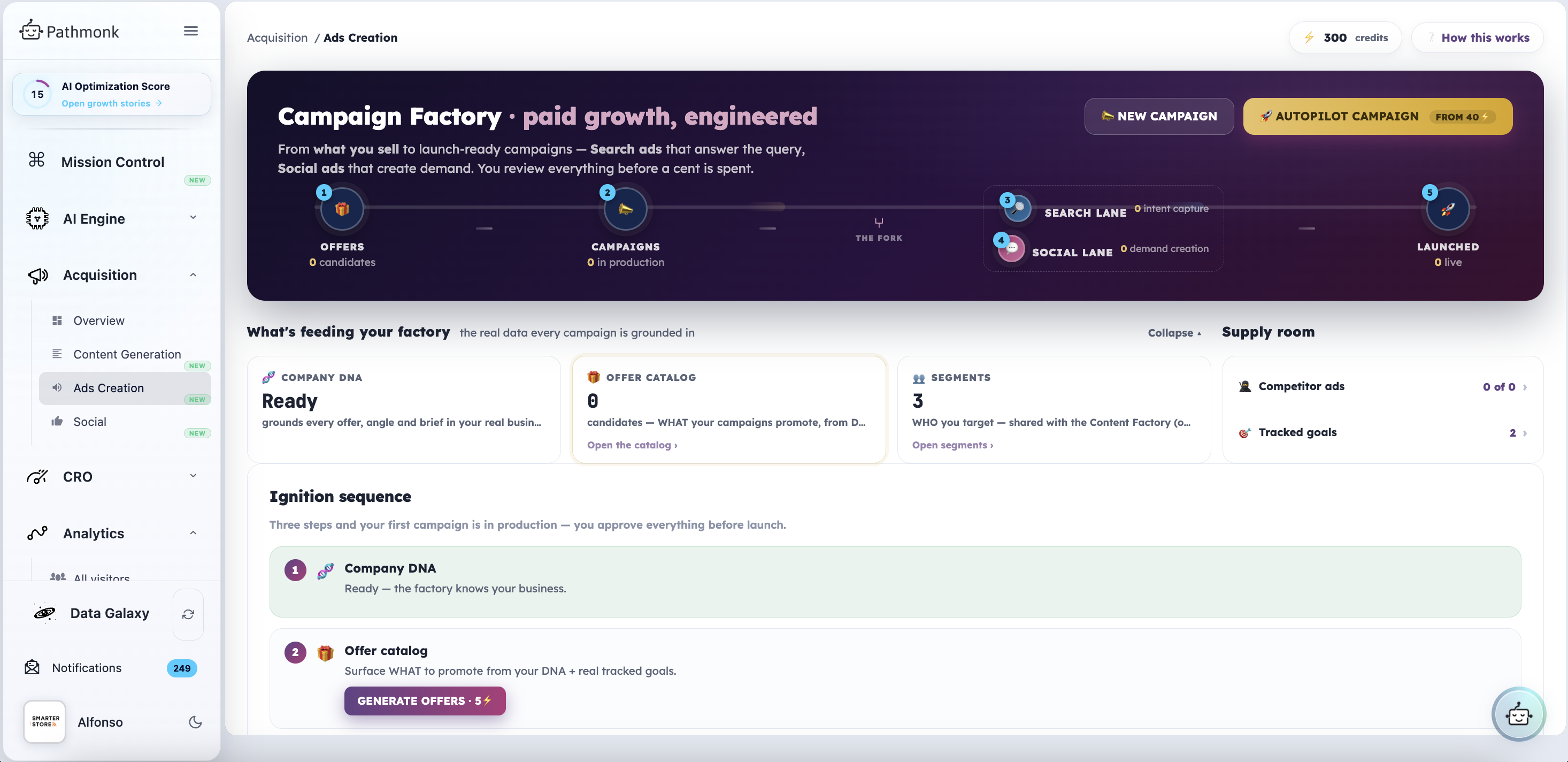
The pipeline runs Offers → Campaigns → the fork → Launched, where the fork splits into a Search lane (intent capture) and a Social lane (demand creation).
What feeds it is shown at the top of the page, because every campaign is grounded in real data rather than invented from a prompt:
- Company DNA, which grounds every offer, angle and brief in your actual business
- The offer catalog, what your campaigns promote, surfaced from your DNA and your tracked goals
- Segments, who you target, shared with the Content Factory so both stay consistent
- The supply room, with competitor ads and tracked goals
To start, click New campaign and go through it yourself, or pick Autopilot campaign and let Pathmonk do the work. Either way you review everything before a cent is spent, and because it is all built from your Company DNA, the campaigns and ads match your branding and positioning.
Social: the Social Factory
Acquisition → Social takes your content pillars and turns them into a steady, on-brand posting program across LinkedIn, Instagram, X and Facebook, planned on one calendar, produced by AI and reviewed by you.
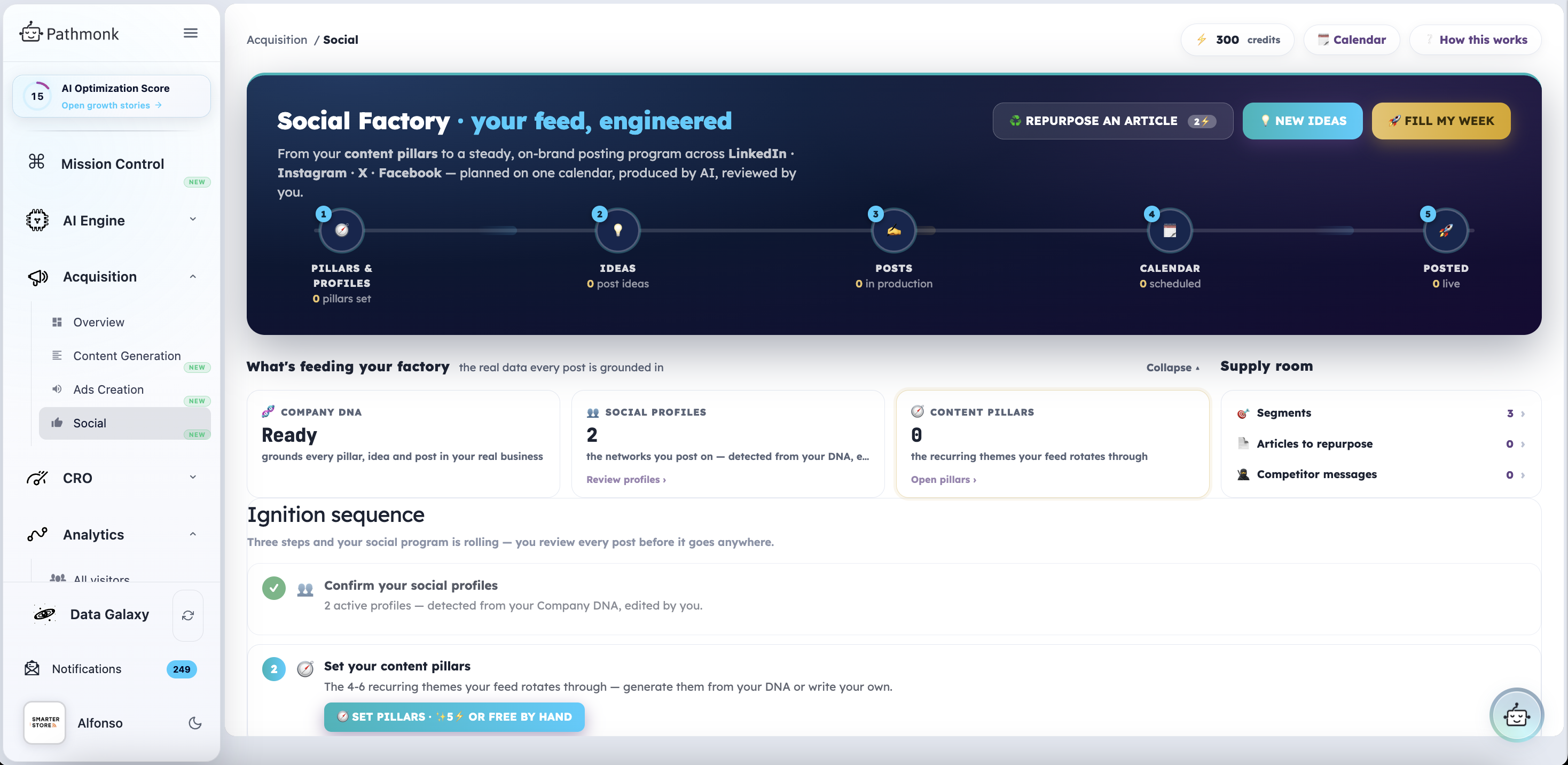
The pipeline runs Pillars & profiles → Ideas → Posts → Calendar → Posted.
Set it up in two steps:
- Confirm your social profiles. Pathmonk detects the networks you post on from your Company DNA. Review them and edit if anything is missing.
- Set your content pillars. These are the four to six recurring themes your feed rotates through. Generate them from your DNA, or write your own by hand.
Once that's in place you have three ways to fill the calendar:
- Repurpose an article, turning something you already published into posts
- New ideas, generating fresh post ideas from your pillars
- Fill my week, going straight to a planned week of content
You review every post before it goes anywhere.
Why everything matches your brand
All three factories read from the same place: your Company DNA. That's why the articles, the ad copy and the social posts come out sounding like your business rather than generic AI output, and why your segments are shared between the Content Factory and the Campaign Factory instead of being redefined in each one.
If something the factories produce feels off-brand, the fix is usually in the DNA rather than in the individual piece. See Reviewing and editing your Company DNA.
A note on credits: generation actions such as clusters, offers, pillars and Autopilot runs consume credits, and the cost is shown on each button before you click it. Your balance is in the top bar of every factory page.