
Adding and whitelisting subdomains
If your website spans several subdomains — a blog, a shop, a customer portal, a separately hosted signup flow — you can whitelist up to two of them in Pathmonk.
What whitelisting actually changes
| Works without whitelisting | Needs whitelisting | |
|---|---|---|
| Analytics and visitor tracking | ✅ | — |
| Conversions on a thank-you page | ✅ | — |
| Conversions tracked via a Pathmonk pixel | ✅ | — |
| Microexperiences displaying | ❌ | ✅ |
So:
- Whitelist a subdomain if you want Pathmonk's microexperiences to appear there — on your blog, your shop, your portal.
- Don't bother if it's just a conversion you track with a pixel. This is already covered.
This is the source of a specific and confusing support ticket: cards work fine on the main site, and silently don't appear on the blog. Nothing is broken — the subdomain just isn't whitelisted.
How to whitelist a subdomain
- Log in to crm.pathmonk.com.
- Click your name at the bottom of the left-hand sidebar, then Settings.
- Select Domains. (Or go straight there: crm.pathmonk.com/dashboard/settings?tab=domains)
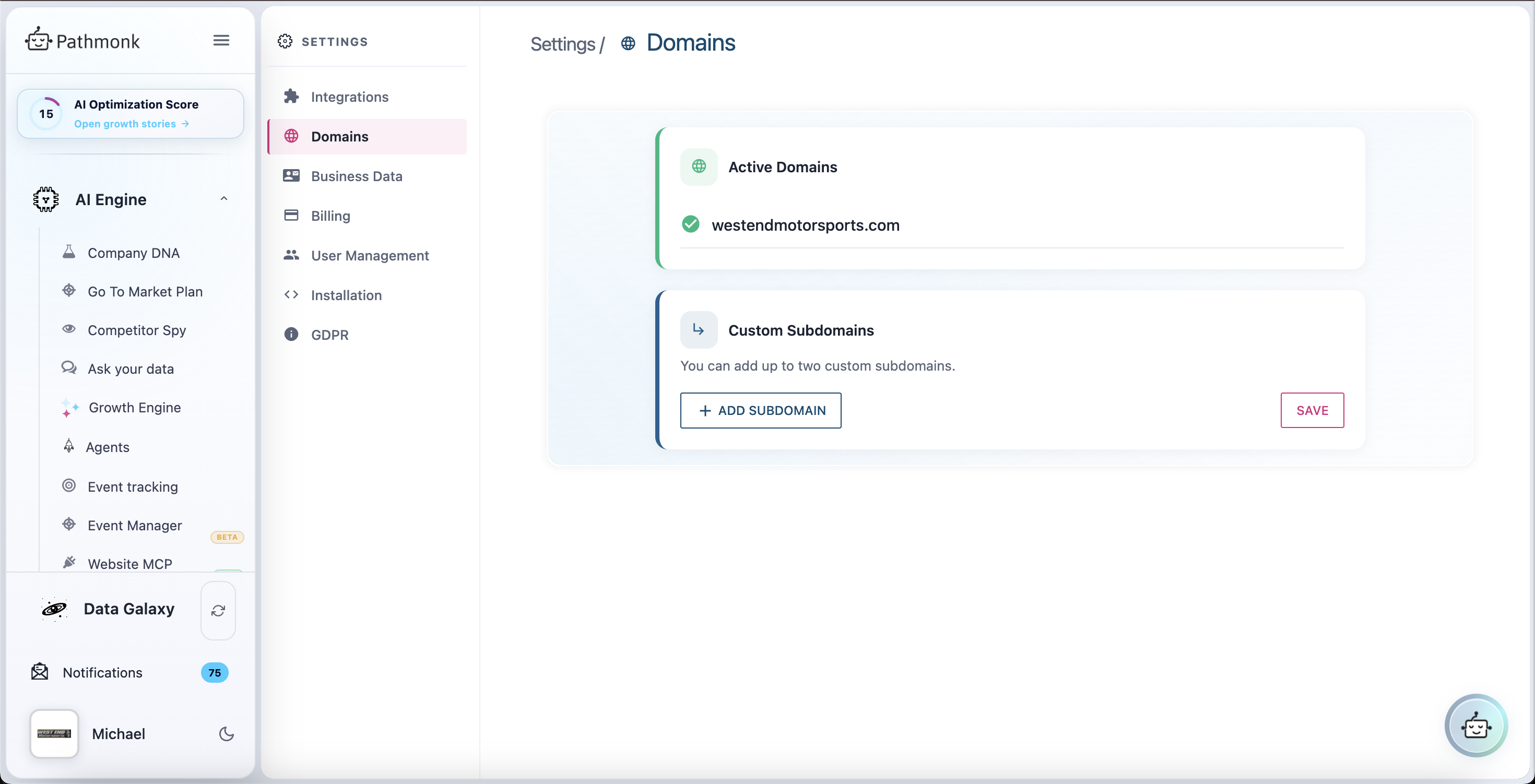
- Under Custom Subdomains, click + Add subdomain.
- Enter only the subdomain part — type
blog, notblog.website.com. - Click Save.
- Repeat if you need a second one.
Pathmonk verifies the connection automatically after you save. Your main site appears above, under Active Domains, with a green check once it's connected — you don't add that one yourself.
What counts as a subdomain
A subdomain is the part that comes before your main domain. It's usually a separate section of the site, often on different software.
| Address | Typically |
|---|---|
blog.website.com | Blog or content hub |
shop.website.com | Online store |
portal.website.com | Customer or user login area |
signup.website.com | A separately hosted signup or checkout flow |
If Pathmonk is installed on www.website.com, each of these is a different address as far as microexperiences are concerned — hence the whitelist.
What isn't a subdomain: a path on your main site. website.com/blog is already covered by your main domain and needs nothing.
www counts as a separate domain
www.website.com and website.com are not the same address to Pathmonk. If your site is reachable at both and you want microexperiences on both, add www as a custom subdomain — and note that it uses one of your two.
Most sites redirect one to the other, in which case you only need the one visitors actually land on. Check which version your site serves before spending a slot on it.
What if my conversion happens on a subdomain?
Nothing to do. Pathmonk tracks conversions across your website, including on a different subdomain, without whitelisting. That covers thank-you pages on thankyou.website.com, checkout on signup.website.com, and forms hosted elsewhere.
Whitelist only if you also want microexperiences to display on that subdomain.
How many can I add?
Two. That's per account, on top of your main domain.
Need more than two, or a staging or sandbox environment? Email support@pathmonk.com — the team will look at your setup and sort it out.
Cards still aren't showing after whitelisting
Work through these in order:
- Is the snippet on the subdomain at all? Whitelisting grants permission; it doesn't install anything. If the blog runs on separate software with its own templates, it needs the snippet too. See Installing Pathmonk on your website.
- Did you enter just the subdomain part?
blog, notblog.website.comand nothttps://blog.website.com. - Did you click Save? Adding a row and leaving the page won't keep it.
- Give it a moment. Verification isn't always instant — reload the Domains screen.
- Still nothing? Go to Is Pathmonk not connecting to your website?, which covers caching, CSP, and consent tools.
If the subdomain is connected and you're simply not seeing cards yet, that may be normal — the engine calibrates before it starts serving.